Most end-to-end tests stop at the same sentence: "Check your inbox." The form submits, the app sends a mail, and the test has no way to open it. So the last step — clicking the link, typing the code — gets done by a human, or never.
An email testing API fixes that. Your test creates a real inbox, your app sends to it, and the message comes back as JSON a second later.
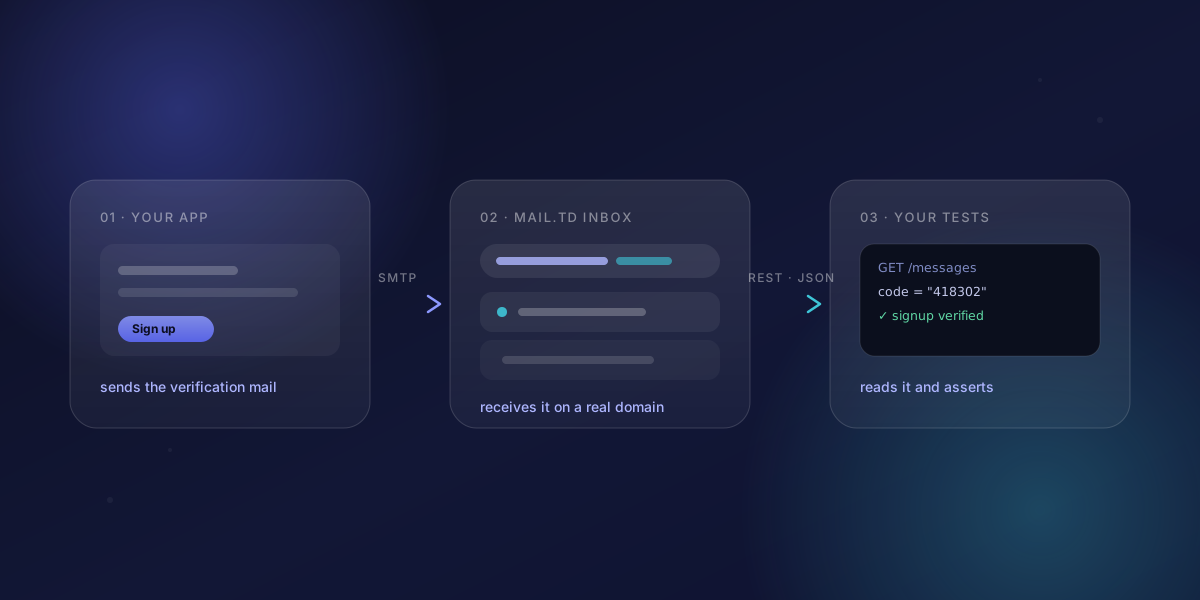
What is an email testing API?
An email testing API is a service that receives real email at addresses you create on demand, and hands the messages back to your code over HTTP. No mail client, no shared account, no manual step.
That is what the Mail.td API does. The temp mail inbox on the homepage is the same thing with a human in front of it — same domains, same mail servers, same messages. One door is a web page; the other is a REST endpoint.
Why email is the hardest part of an end-to-end test
Most teams end up with one of these, and each one gives something up:
| Approach | What it proves | Where it breaks |
|---|---|---|
| A shared Gmail or Outlook account | Mail really got delivered | Two CI jobs grab the same unread message; logins and security prompts get in the way |
| A local SMTP catcher | Your code called send() | The mail never leaves the machine — no real delivery, no real headers |
| A public temp mail website | It's free and instant | No API to depend on, and anyone who guesses the address can read your reset links |
| An email testing API | Real delivery, read from code | You need an account and a token |
The last row is the only one where the test does the whole flow the way a user would.
How to get a test inbox over HTTP
Sign in at Mail.td, create an API token in the dashboard, and you are two requests away from a working inbox.
export TD_TOKEN="td_xxxxxxxxxxxxxxxxxxxx"

# 1. Make an inbox
curl -X POST https://api.mail.td/api/accounts \
  -H "Authorization: Bearer $TD_TOKEN" \
  -H "Content-Type: application/json" \
  -d '{"address": "signup-4821@example.com", "password": "s3cret"}'

# 2. Read what arrived
curl https://api.mail.td/api/accounts/signup-4821@example.com/messages \
  -H "Authorization: Bearer $TD_TOKEN"
The first call returns the inbox id and address. The second returns a short list — id, sender, subject, created_at, is_read — and fetching one message by its id gives you the whole thing: text_body, html_body and attachments[].
These are ordinary addresses on real domains, not fakes. GET /api/domains lists the domains you can use and is the one endpoint that needs no token at all.
How to catch a verification code in a test
Every email-dependent test is the same three steps: make an inbox, use it in the UI, wait for the mail. Here is the whole helper — plain fetch, so it drops into Playwright, Cypress, Selenium, Jest or a shell script unchanged.
const AUTH = { Authorization: `Bearer ${process.env.TD_TOKEN}` };

async function newInbox(label) {
  const address = `${label}-${Date.now()}@example.com`;
  await fetch("https://api.mail.td/api/accounts", {
    method: "POST",
    headers: { ...AUTH, "Content-Type": "application/json" },
    body: JSON.stringify({ address, password: "s3cret" }),
  });
  return address;
}

async function waitForCode(address, timeoutMs = 30000) {
  const deadline = Date.now() + timeoutMs;
  while (Date.now() < deadline) {
    const { messages } = await fetch(
      `https://api.mail.td/api/accounts/${address}/messages`,
      { headers: AUTH },
    ).then((r) => r.json());

    if (messages.length) {
      const msg = await fetch(
        `https://api.mail.td/api/accounts/${address}/messages/${messages[0].id}`,
        { headers: AUTH },
      ).then((r) => r.json());
      return msg.text_body.match(/\b\d{6}\b/)?.[0];
    }
    await new Promise((r) => setTimeout(r, 1000));
  }
  throw new Error(`No mail for ${address} after ${timeoutMs}ms`);
}
Swap the regular expression for a link matcher and the same helper tests password resets and magic links.
Webhooks or polling: which one for test email?
Polling means asking again and again until the mail shows up. It works everywhere, but every test pays for the wait.
A webhook flips it around: you register a URL once, and Mail.td posts each new message to you the moment it lands.
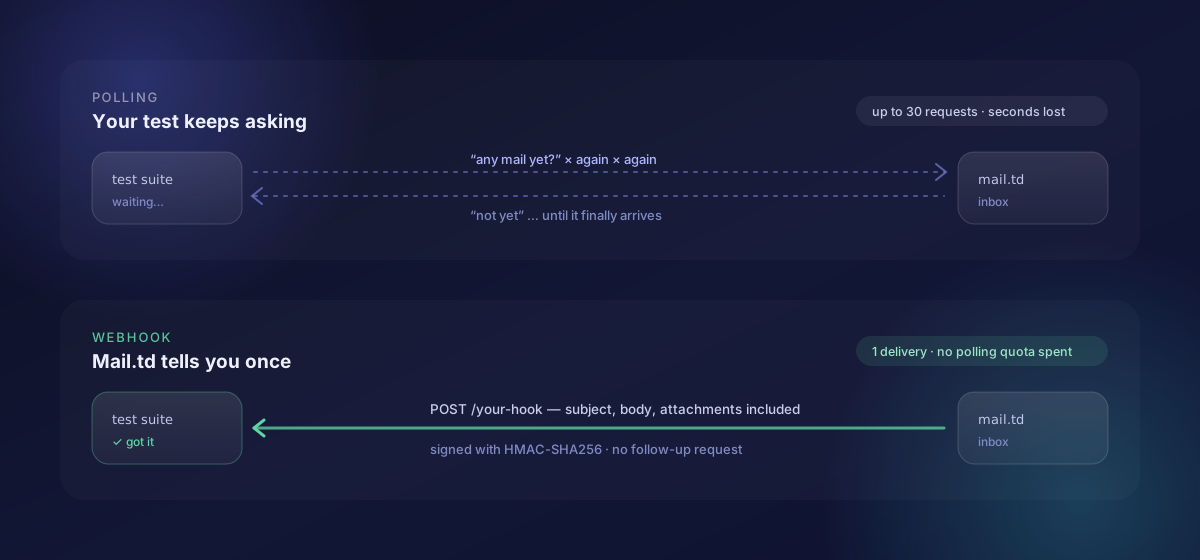
The payload is an email.received event, and it already contains from, to, subject, text_body, html_body and attachments[] — so there is nothing left to fetch.
Every delivery is signed, so you can tell a real one from a fake. Each request carries X-Webhook-ID, X-Webhook-Timestamp and X-Webhook-Signature: sha256=<hex>. The signature is an HMAC-SHA256 of timestamp + "." + raw body, keyed with your webhook secret:
import crypto from "node:crypto";

function verify(rawBody, headers, secret) {
  const expected = crypto
    .createHmac("sha256", secret)
    .update(`${headers["x-webhook-timestamp"]}.${rawBody}`)
    .digest("hex");
  return crypto.timingSafeEqual(
    Buffer.from(`sha256=${expected}`),
    Buffer.from(headers["x-webhook-signature"]),
  );
}
Check it against the raw bytes, before parsing the JSON. Webhooks are a Pro feature; secrets can be rotated, and past delivery attempts are listed in the API, so a hook that quietly stopped firing is something you can look up.
Rule of thumb: if your test runner can accept an inbound HTTP request, use a webhook. If it is behind NAT or a laptop firewall, poll.
How to run email tests in parallel
Give every job its own inbox and the shared-mailbox race disappears. Put the run and shard number in the address:
reset-${RUN_ID}-${SHARD}@example.com
Now a failing build's mail is easy to tell apart from the next run's — which matters more than it sounds when you are reading a log three days later.
There is no cleanup step to write. Inboxes are cheap, old messages expire on their own, and a test that dies halfway leaves nothing behind for the next run to trip over.
How to test email on your own domain
If staging receives on a shared domain but production receives on yours, one path stays untested. Adding a custom domain puts your own MX records in front of the same API: verify the domain once, then create inboxes on it exactly like any other. Your tests then travel the same route your real mail does.
What you can check inside a message
Because the message is data, the assertions get specific:
text_bodyandhtml_body— copy, links and markup. Catches a template that lost its footer, or a reset link pointing at the wrong environment.attachments[]— filename, type and size, before you download anything. A 0-byte invoice PDF fails fast.- The raw message source — for header checks: the
Fromthat really went out, aReply-Toyour provider rewrote, a custom header your queue was supposed to add.
Beyond signup: what else teams test with a real inbox
Verification, OTP and password reset are the flows people start with, because they block a user from getting in. They are not where it ends — anything your product sends is worth an assertion:
- Transactional mail. Order confirmations, receipts, invoices, shipping updates. Did the total match? Did the PDF attach, and is it more than 0 bytes?
- Account and security notices. Email-changed, password-changed, new-device alerts. These often go to the old address as well — easy to break, rarely tested.
- Team and billing flows. Invitations, role changes, trial-ending and payment-failed notices, each triggered by a state change rather than a button.
- Digests and scheduled jobs. A nightly summary that silently stopped sending looks exactly like a quiet week. A test inbox turns that into a failing build.
- Localised templates. Send the same event in each language you ship and check the subject line, the date format and that no placeholder leaked through untranslated.
- Negative cases. The mail that must not go out: no reminder after an order is cancelled, no duplicate on a retried webhook, no message to an unsubscribed address.
- Headers and unsubscribe. The raw source lets you assert on
From,Reply-ToandList-Unsubscribe— the parts that decide whether bulk mail is treated well.
The mechanics are identical in every case. Make an inbox, trigger the event, read what arrived.
Rate limits, quota and tokens
- Requests per second: 8/second per IP without a token, 4/second on Free, 10/second on Pro. Go over and you get
429withrate_limit_exceeded. - Monthly operations: Free includes 100 — enough to try the API, not to run a suite. Pro tiers run from 10,000 to 1,000,000 operations per month. A 30-try polling loop can spend 30; a webhook delivery spends none.
- If the quota runs out, mail keeps arriving — only the API is gated. You lose reads, not messages.
- Tokens start with
td_and are shown once. Keep one in your CI secrets; revoke it from the dashboard or the API if it leaks.
SDKs for Node.js, Python and Go
npm install mailtd                    # Node.js / TypeScript
pip install mailtd                    # Python
go get github.com/mailtd/mailtd-go    # Go
All three wrap the same endpoints and the same token.
Start with two curl commands
Mint a token, run the two curl calls above against a real domain, and watch a message come back as JSON. That is the entire integration surface — wrapping it in your test framework is an afternoon's work.
The API reference has every endpoint, and Integrating Temp Mail into Tests and CI covers the framework-specific patterns.
Temp mail is the half of Mail.td people see. The receiving pipeline underneath is the half your test suite needs.